


Oracle Fusion Cloud Supply Chain & Manufacturing customers are entering a critical phase in the transition from the Classic user experience to Oracle Redwood. For organizations with years of accumulated page personalizations, configurations, extensions, reports, security changes, and business-specific workarounds, Redwood migration is not simply a user-interface upgrade. It is a customization transformation program.
The organizations that approach Redwood as a “turn it on and test it” exercise risk discovering late in the process that important business processes depend on Classic-page behavior or personalizations that do not translate directly to Redwood. A stronger approach starts with an inventory, impact assessment, prioritization model, remediation plan, and structured testing strategy. That gives organizations an opportunity not only to prepare for Redwood, but also to simplify their Oracle footprint while preserving the business capabilities that still matter.
This is especially important as customers plan around the Oracle Fusion 27B release horizon. Oracle is progressively moving SCM capabilities toward Redwood, with some Redwood experiences becoming enabled by default as releases advance. Oracle’s SCM readiness guidance directs customers to review Classic-to-Redwood page mappings and features whose opt-in periods expire as part of their adoption planning.
For that reason, 27B should be treated as a business readiness deadline, not a date to begin the migration.
Why a Redwood Migration Strategy Matters
A common misconception is that because Oracle is delivering the Redwood page, existing Classic customizations will simply move with it. That assumption can create substantial project risk.
Classic Oracle Fusion pages may have been personalized over several years. Those changes can include field visibility and labels, required or optional attributes, page layouts, business rules, default values, validation behavior, role-specific experiences, Page Composer configurations, application extensions, flexfields, reports, security, integrations, approval processes, and user-specific navigation patterns.
When Oracle introduces a Redwood page, the underlying user experience and extension model can be different. Oracle’s Redwood migration guidance therefore recommends inventorying custom assets, developing an adoption plan, and testing in a dedicated environment before production deployment.
The most useful question is not simply, “Which customizations do we have?” It is, “Which customizations do we still need, what business value do they provide, and what is the appropriate Redwood-native way to deliver that capability?”
That distinction shifts the project from customization migration to customization rationalization.
Four Outcomes for Every Classic Customization
A strong Redwood migration strategy should give every significant customization an explicit disposition. Rather than rebuilding everything by default, teams should evaluate the underlying business requirement and choose one of four paths:
- Retain: The business requirement remains valid and the capability still needs to exist in Redwood. The implementation team determines the appropriate Redwood-compatible approach.
- Redesign: The requirement remains important, but the Classic implementation should not simply be reproduced. This may be an opportunity to simplify the solution using Redwood capabilities, Visual Builder Studio, application extensions, configuration, or other supported mechanisms.
- Retire: The customization is no longer required. Removing it prevents the Redwood program from carrying years of unnecessary technical debt into the new experience.
- Replace: Oracle Redwood UI now provides standard functionality that delivers the required business capability, allowing the organization to adopt the standard feature rather than rebuild the old customization.
The guiding principle is simple: do not migrate customizations simply because they exist. Migrate business capabilities because they still matter and provide real value to the business.
Accelerating Customization Migration Strategy with the Redwood Personalization Helper Tool
One of the most useful starting points for SCM customers is Oracle’s Redwood Personalization Helper Tool for SCM. Oracle introduced the SCM version to help customers identify Classic UI/ADF page personalizations and present the findings in an easier-to-consume format.
Instead of relying exclusively on administrator interviews or manually opening hundreds of Classic pages, the tool provides a structured starting point for the customization assessment. It can help teams identify which Classic pages have been personalized, where personalization is concentrated, what types of changes exist, and which areas require deeper investigation.
That makes the Helper Tool particularly valuable early in a Redwood program, when the organization is trying to establish a reliable current-state inventory.
What the Helper Tool Does, and What It Does Not Do
The Helper Tool is an accelerator for assessment and migration planning. It is not a substitute for a complete Redwood implementation methodology.
At its core, the tool helps answer, “What do we have?” The implementation team still has to determine what each finding means for the business and what should be done about it. That analysis becomes especially important when a page-level personalization is connected to business rules, security, integrations, reports, extensions, approvals, or downstream processes.
When being utilized correctly, the tool can accelerate customization discovery, expose historical personalization activity, improve visibility into technical debt, and create a more objective baseline for planning. Once the inventory exists, teams can classify findings by business criticality, technical complexity, Redwood availability, migration approach, testing requirements, ownership, target release, and risk.
The result is more than a technical report. It becomes a program backlog that gives business and IT teams full visibility to the current technical inventory that drives the basis for decision-making.
Turning the Inventory into a Redwood Migration Plan
The Helper Tool should be one component of a broader migration lifecycle. A practical sequence is:
- Establish a controlled environment and collect the appropriate Fusion personalization information.
- Run the Redwood Personalization Helper Tool and generate the available inventory.
- Build a project-level customization register that connects each finding to its module, business owner, criticality, Redwood equivalent, migration path, disposition, testing requirements, target release, and status.
- Perform a business impact assessment. A hidden field used by a small administrative group should not receive the same attention as a personalization that changes how buyers create purchase orders.
- Determine the target Redwood solution and classify each item as retain, redesign, replace, or retire.
- Configure and build the target-state solution using the appropriate supported Redwood approach.
- Validate the complete end-to-end business process, not simply whether an individual field or page appears correctly.
This is the point where discovery becomes implementation. A tool can identify a personalization, but it cannot interview business stakeholders, determine business criticality, resolve conflicting requirements, redesign a process, validate security, coordinate integration testing, train users, or establish post-go-live governance.
In other words, the tool accelerates the “what.” The implementation strategy has to address the “why” and the “now what.”
Elire’s Structured Redwood Migration Methodology
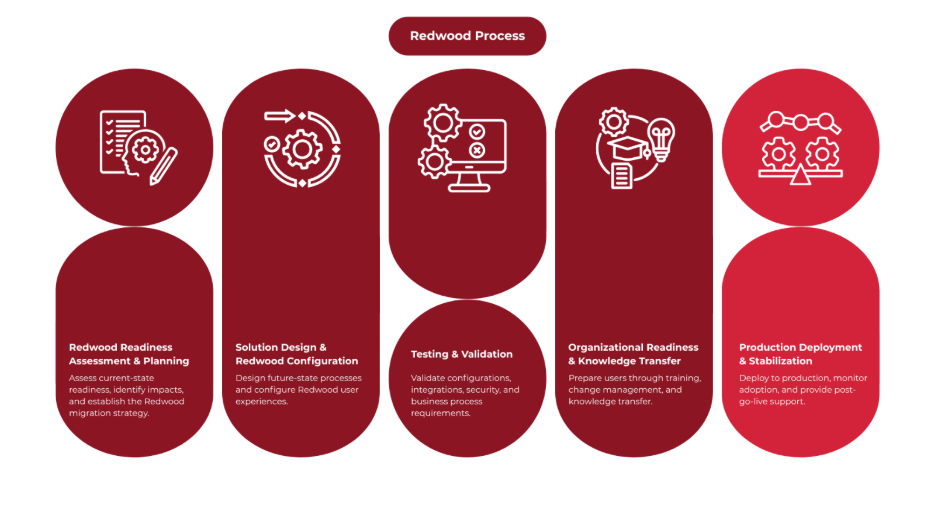
A controlled Redwood migration should move from assessment through production adoption in defined stages. Elire’s recommended approach follows a five-stage methodology: Mobilize → Pilot → Test → Deploy → Stabilize.
The following example demonstrates how this methodology can be applied to migrate a custom “Edit Purchase Agreement” amount limit from the Classic UI to Redwood.
1. Mobilize
Mobilize establishes governance, creates visibility into the current environment, and builds the initial roadmap. This includes project kickoff, functional and technical architecture review, environment planning, stakeholder identification, resource planning, and decision-making governance.
This is also where the customization inventory begins. The Helper Tool findings should be combined with existing configuration documentation, security analysis, integration inventories, business-process documentation, reports, extensions, known production issues, and interviews with business owners. The goal is to establish a single source of truth for Redwood impacts and address these impacts with the organization. This is a key step in successful upgrades, placing change management strategy right at the beginning of the project.
2. Pilot
The Pilot phase turns the assessment into a practical target-state design. Teams conduct workshops, configure Redwood profile options and features, update security, build test scenarios, document risks and dependencies, and structure Organizational Change Management and training.
This is where customization decisions become concrete. A buyer-specific field may need to be redesigned. A custom label may be retired if the standard Redwood label is sufficient. A business-critical validation may need to be rebuilt using a supported Redwood approach. A legacy report shortcut may be replaced with standard analytics. An old workaround may simply be retired.
The purpose is to avoid a one-for-one recreation of the Classic environment.
The following example walks through this approach, showing how a custom “Edit Purchase Agreement” amount limit can be migrated from the Classic UI to Redwood.
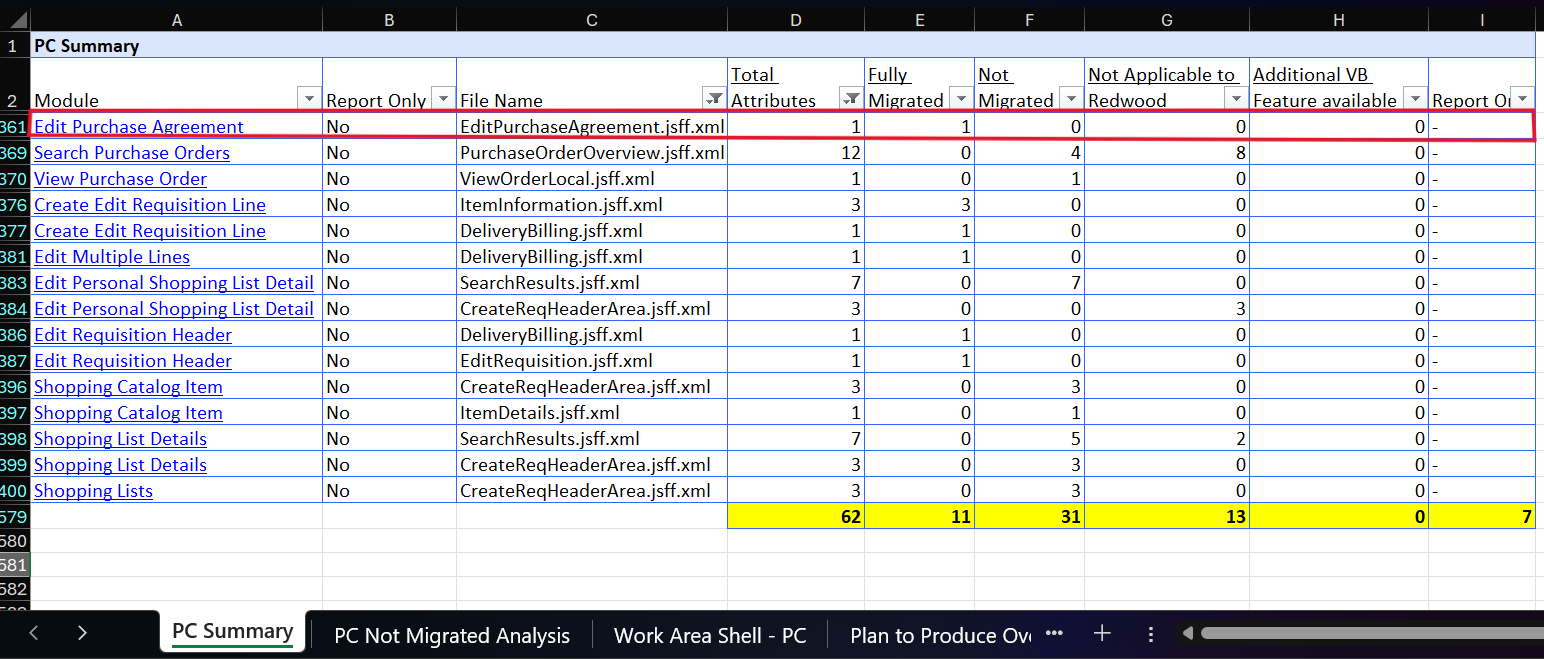
Redwood Current Customization Report
Important note:
- Fully Migrated=Personalizations that can be carried over / supported in Redwood.
- Not Migrated = Personalizations that do not migrate to Redwood and may need to be recreated or handled differently.
- Not Applicable to Redwood = Personalizations that no longer apply because the Redwood page/design works differently.
- Additional VB Feature Available = Items that aren't directly migrated but can be achieved using an additional Visual Builder (VB) capability.
Redwood Customization Tool Output
.png)
Change Added in VBS After Migration is Run
.png)
This image shows the change that is added in VBS once the migration is run. As you an see in line 18 the amount limit field is being added. From here, we preview the change and publish once verifying accuracy.
3. Test
Testing is where the Redwood migration strategy is proven. A strong Redwood test strategy goes beyond individual pages and validates complete business processes.
For SCM, that could mean testing Requisition → Approval → Purchase Order → Receipt → Invoice, or Sales Order → Scheduling → Fulfillment → Shipment → Financial Flow.
The objective is to prove that the Redwood experience preserves the required business outcome, including security, integrations, approvals, reporting, and downstream behavior, rather than simply reproducing the appearance of a Classic page.
The examples below compare the “Edit Purchase Agreement” customization before and after migration, illustrating how the experience translates from Classic to Redwood.
"Edit Purchase Agreement" - Classic Vs Redwood Comparison
Classic:
.png)
Redwood:
.png)
4. Deploy
Once testing is complete, the organization prepares for production adoption. Production configuration is validated, communications and training are finalized, support teams are prepared, and users move into the Redwood experience through a controlled cutover.
A formal go/no-go decision should be based on measurable readiness criteria, including whether critical customizations and business processes have passed, security and integrations have been validated, UAT is approved, training is complete, support is prepared, and cutover activities have been rehearsed.
5. Stabilize
Going live is not the end of Redwood adoption. The Stabilize phase focuses on post-go-live support, open issues, user adoption, deferred requirements, lessons learned, and the governance needed for future Redwood enhancements.
This matters because Redwood will continue to evolve through Oracle’s quarterly release model. Organizations need an ongoing mechanism for evaluating new Oracle updates rather than repeating a major migration exercise every time the application changes.
The Real Value of a Redwood Migration Strategy
The biggest mistake organizations can make is to view Redwood as a technical conversion. A successful Redwood program combines application modernization, customization rationalization, process improvement, and change management.
The transition creates an opportunity to revisit questions that may not have been asked in years: Why was this customization created? Is the underlying business requirement still valid? Does Oracle now provide standard functionality? Can the requirement be delivered using the Redwood architecture? Is the customization worth maintaining? Does the process itself need to change?
Those questions can reduce the complexity of the future Oracle environment. A well-executed program should leave the organization with fewer unnecessary customizations, better documentation, cleaner configuration, clearer ownership, stronger security governance, more standardized processes, improved testing, better release readiness, and a more sustainable extension strategy.
Why Organizations Should Start Before 27B
For organizations planning around 27B, waiting until the release is approaching is risky because Redwood readiness depends on a sequence of activities: Discovery → Assessment → Design → Configuration → Development → Testing → Training → Deployment.
Each stage requires time, business participation, and environment availability. More importantly, many decisions cannot be made by the technical team alone. Business owners have to identify essential capabilities. Security teams need to validate access. Functional teams need to confirm alignment between functionalities and business process. IT teams need to validate integrations and extensions. Users need to execute and fully validate the system in UAT. Training and support teams need time to prepare for the new experience.
That is why 27B should be the target for readiness, not the starting point for the project.
Where an Oracle Implementation Partner Adds Value
The strongest Redwood programs combine Oracle’s tools with experienced implementation execution. The Helper Tool can accelerate discovery, but a complete program still requires functional, technical, security, testing, change management, and deployment expertise.
An implementation partner can connect the inventory to the broader work required for Redwood readiness, including Classic-to-Redwood page assessment, customization rationalization, target-state solution design, Visual Builder Studio considerations, supported extensions, security design, integration remediation, SIT and UAT, regression testing, stakeholder engagement, training, cutover planning, hypercare, and long-term governance.
That combination is what turns a list of Classic personalizations into a controlled modernization program.
What's Next?
The closer organizations get to 27B, the less time they will have to assess customizations, redesign critical processes, test the Redwood experience, and address issues before adoption becomes necessary. Starting now gives your team more time to make those decisions strategically instead of reacting to them later.
Elire can help you understand where you stand today and build a practical path to Redwood. Our Oracle Cloud experts can support customization discovery and rationalization, Redwood redesign, testing, and adoption to help your organization prepare for 27B with a clear plan.
Talk to an Elire Expert About Your Redwood Migration Strategy
Connect NowFor additional guidance on preparing for 27B, read our updated Don’t Wait for 27B: A Practical Guide to Oracle Redwood Adoption for a broader look at Redwood readiness and adoption.
For more Oracle Cloud insights and product updates, subscribe to Elire’s monthly Cloud Newsletter and follow Elire on LinkedIn and YouTube for expert overviews, how-tos, and product demos.



.png)
.png)
